|
|
|
Storerrom Requirements
|
|
|
Internet security
- Right click on i.e. icon (on your desktop) -> Properties
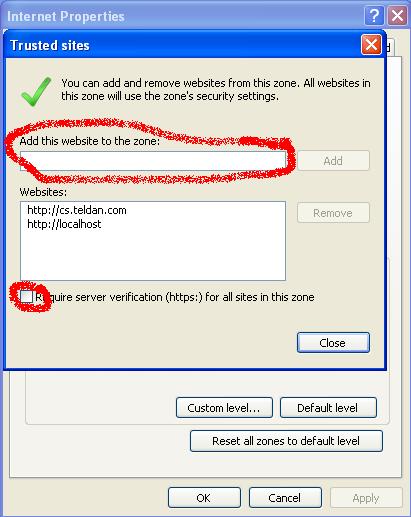
- Go to "Security" Tab and press on "Trusted Site" then Press On "sites" button
- At the first text box Enter:http://cs.teldan.com make sure that the checkbox "Require server...." doesn't checked then press on "Add" button then Press on "Close" button
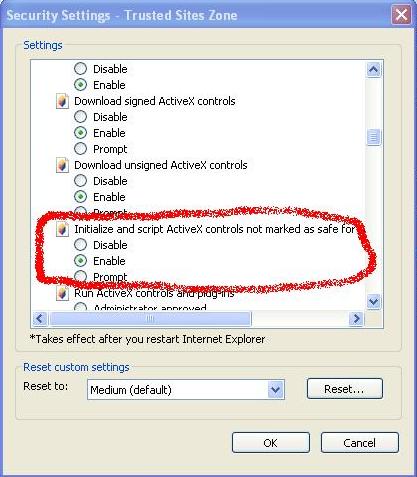
- Press On "Custom level..." button Scroll down to the "ActiveX controls an plug-ins" section then make sure "Initialize and script ActiveX controls not marked as safe for scripting" is Enable
|
Internet security - Windows 10
- Open Microsoft Edge
- Go to http://www.google.com
- Press "..." on the right corner
- Press on "Open with Internet Explorer"
- Go to tools -> Internet Option
- Go to "Security" Tab and press on "Trusted Site" then Press On "sites" button
- At the first text box Enter:http://cs.teldan.com make sure that the checkbox "Require server...." doesn't checked then press on "Add" button then Press on "Close" button
- Press On "Custom level..." button Scroll down to the "ActiveX controls an plug-ins" section then make sure "Initialize and script ActiveX controls not marked as safe for scripting" is Enable
|
|
Download MsXml 6
|
| Download and install MsXml from here
|
|
Printing - Remove Header and Footer
|
| By default there's a small image of a printer, click that and go to "Page Setup...". Below is a screenshot showing the button you're looking for.
|

|
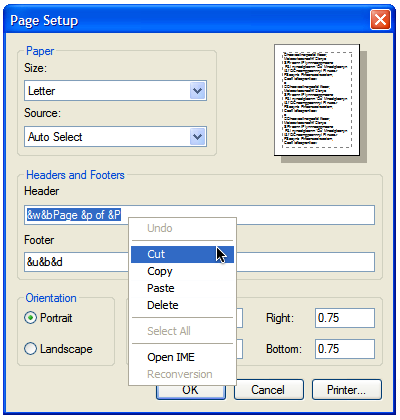
| Go "Page Setup...", then erase the text in the "Headers and Footers text boxes.
|
|
|
Printing background colors
|
Choose at the Internet Explorer - Tools >> Internet Option...
Go to Advance tab then check the option "Print background colors and images".
See Figure 3.
|
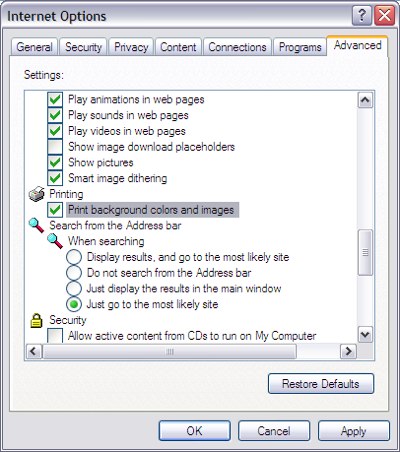
Figure 3
|
|
|
